


Authors
Bridging Offline and Online AI Systems
February 19, 2026
The new Deployments API in Outerbounds allows you to create container images and deploy online services and agents programmatically at scale. See practical examples below, including agents powered by Claude Code.
The vast majority of real-world ML and AI systems span two distinct execution modes: an online component that operates in real time — such as inference services and interactive agent sessions — and an offline component responsible for model training, large-scale data processing, and long-running research or planning agents. The two modes are symbiotically connected: offline training feeds online inference, while latency-sensitive frontends can initiate long-running, offline processing in the background.
Designed for real-world, end-to-end AI systems, Outerbounds natively supports both modes through a cohesive set of APIs that connect them seamlessly. For the past three years, the Events API has enabled programmatic triggering of offline flows.
This article introduces the new Deployments API, which brings the same level of programmatic control to deploying online endpoints. Outerbounds customers who have piloted the API have applied it across a range of use cases, including:
- Traditional ML deployments from training to inference while maintaining offline-online consistency.
- State-of-the-art AI post-training with reinforcement learning to deploy critic models and reward functions automatically.
- Orchestrate deep research agents with sandboxed data and API access, scoped to the lifetime of the agent process.
- Deploy internal UIs, services, and apps with access to newly processed data.
Stay tuned for future articles about specific use cases. Today, we focus on the practical steps that make all of these cases possible.
Programmatic deployments: Beyond the API
Initiating a deployment via an API is only part of the story. If you’ve deployed models or agents using platforms like Vertex AI, SageMaker, or container orchestrators such as Kubernetes, you know that a deployment is not just a click of a button: Before it can happen, a number of preparations need to be made from container images to configuration.
Outerbounds streamlines the entire process. The schematic below illustrates the key components involved in moving from offline (the purple side on the left) to online (the green side on the right) programmatically, across repeated iterations and parallel development branches:
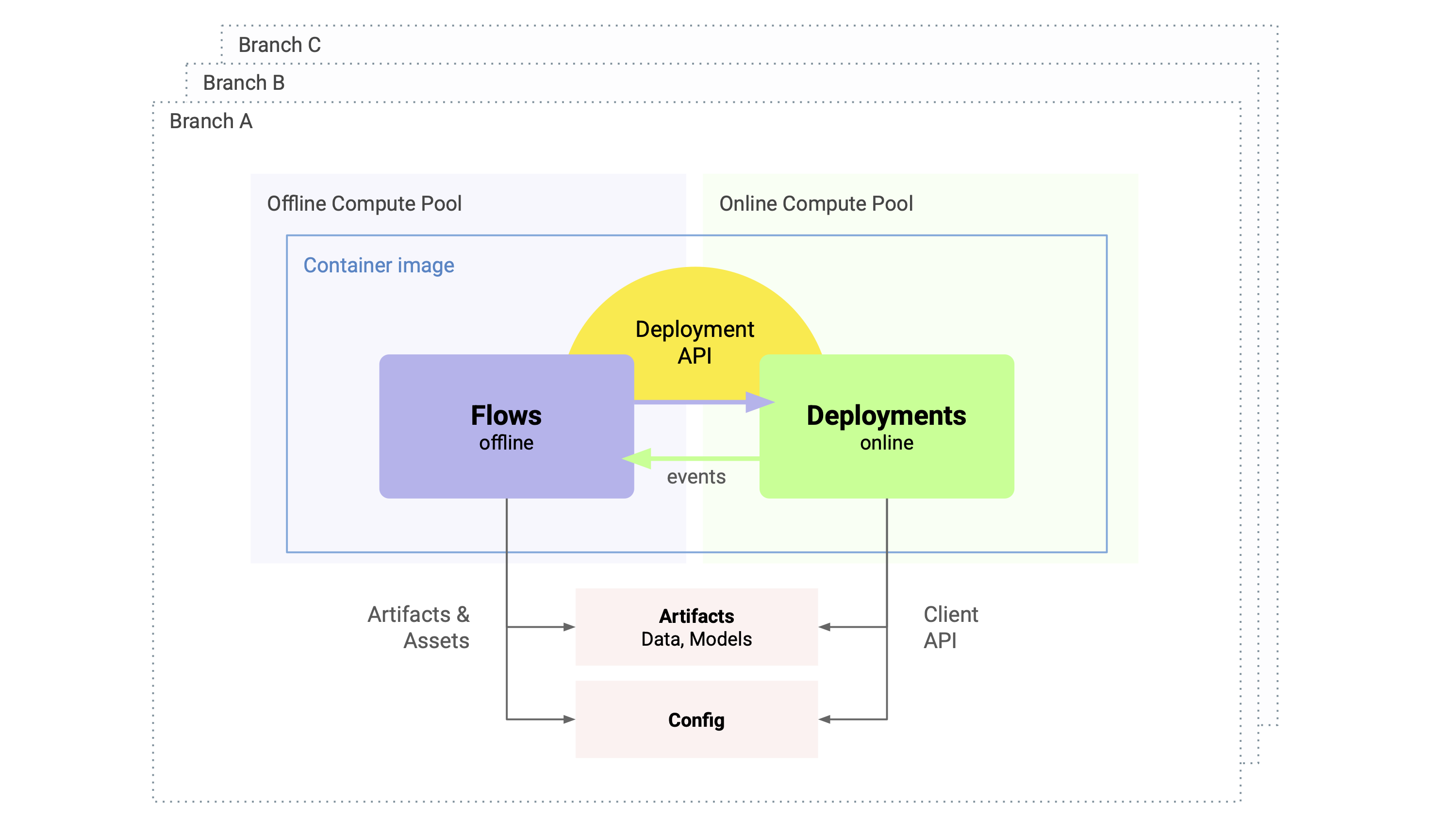
Let’s walk through the elements:
- Flows (the purple box) are used to build and prepare assets - models, data, and metadata - in the background. Flows can encapsulate any offline processing, such as model training, data processing, or deep research agents.
- Flows leverage Metaflow APIs to output strongly versioned artifacts and configs (the pink boxes) that can be handed off to online deployments. These work as a model and asset registry, ensuring that the lineage of deployments can be tracked all the way back to their origins.
- Flows use the new Deployment API (the yellow arc) to invoke online deployments. The API offers a wide range of features that make it easy and consistent to move results and code from the offline side to the online side.
- Online deployments encapsulate any service accessible over HTTP, live agents, or an interactive UI or a dashboard. They auto-scale based on demand and implement a number of authentication schemes.
- Deployments may trigger offline processing through events. This allows you to architect closed loop systems where e.g. a button in a UI or a decision by an agent invokes more resource-consuming background processing asynchronously.
- Both offline and online components require a complete runtime environment — a container image (the blue outline) — to execute reliably. To preserve offline–online consistency, it’s often best to use the exact same image and code in both contexts. Outerbounds makes this seamless with Fast Bakery: container images are built automatically in seconds, and the Deployments API ensures that the very same image is used for both offline and online workloads.
- To maximize development velocity—especially in the age of AI-driven workflows—you can deploy multiple systems, each combining online and offline components, in parallel using branches (dotted outlines). With Outerbounds Projects, you simply open a pull request and the entire stack shown here is deployed automatically into a safely isolated branch environment.
To see how the full stack operates in practice, consider the three illustrative examples below. They are deliberately chosen to highlight the platform’s versatility, going beyond the basic “deploy an existing image as a microservice” pattern (which takes only a few lines of code on Outerbounds).
Example: Deploy artifacts as a FastAPI service with a shared image
The following example demonstrates offline-online consistency in action. The flow creates an artifact, example_artifact — shown here as a simple string, but in practice it could be an arbitrarily complex object, such as a model or a dataframe.
The @app_deploy decorator enables the Deployments API for the flow. It allows us to deploy a service using the very same image (current.apps.current_image) and code packages (current.apps.metaflow_code_package) used by the flow, ensuring no version mismatches between the offline and online components.
from metaflow import FlowSpec, step, current, pypi, app_deploy
from metaflow.apps import AppDeployer
from datetime import datetime

@app_deploy
class HelloDeployer(FlowSpec):

    @pypi(packages={"fastapi-cli": "0.0.23", "fastapi": "0.129.0"})
    @step
    def start(self):
        t = datetime.now()
        self.example_artifact = f"📦 deployed at {t.isoformat()}"
        deployer = AppDeployer(
            name="hello-app",
            port=8000,
            environment={"MF_TASK": current.pathspec},
            image=current.apps.current_image,
            code_package=current.apps.metaflow_code_package,
            commands=["fastapi run server.py"],
        )
        self.app = deployer.deploy()
        print(f"Deployed {self.app}")
        self.next(self.end)

    @step
    def end(self):
        apps = current.apps.list()
        print(f"Deployed {len(apps)} app(s)")

if __name__ == "__main__":
    HelloDeployer()
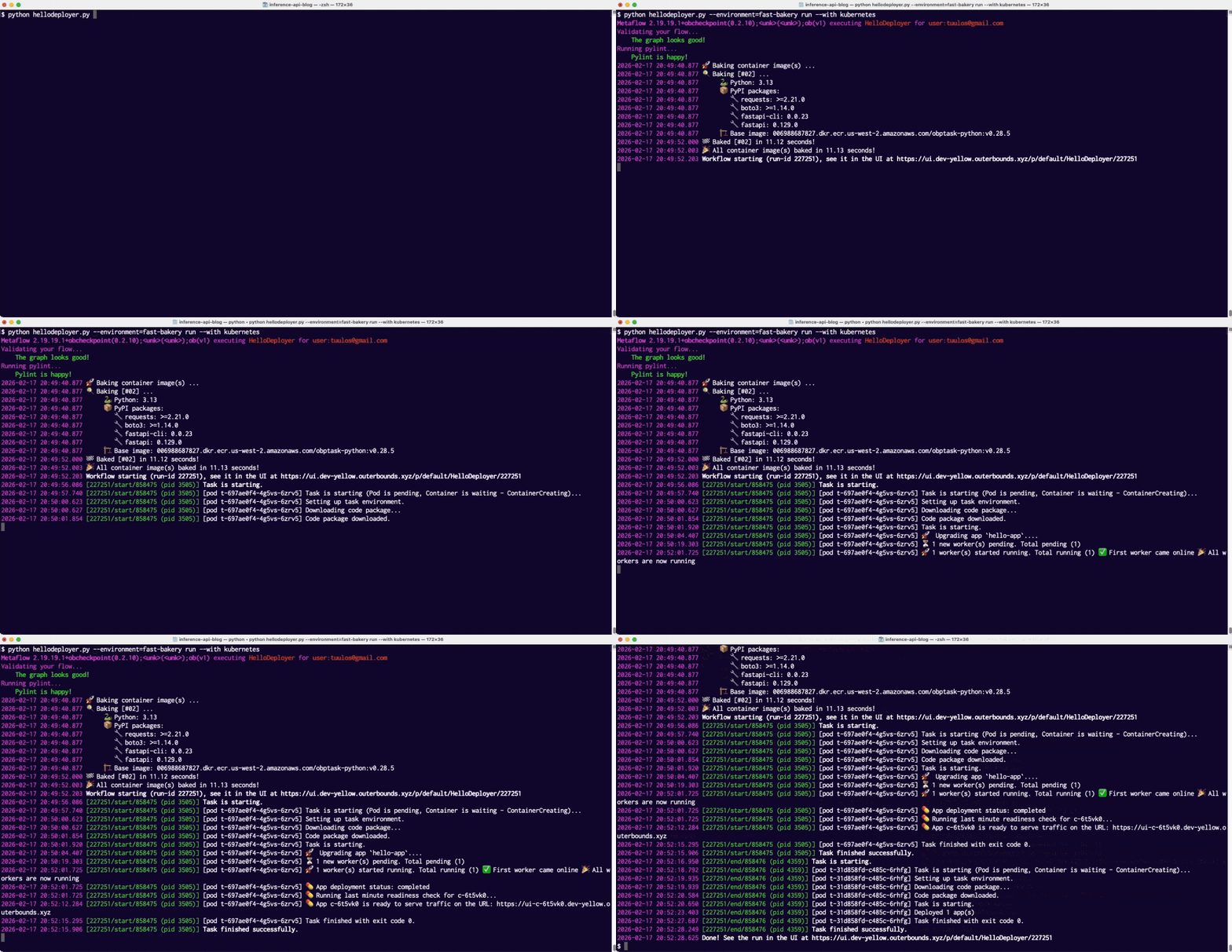
Notably, we define all software dependencies through the @pypi decorator, including FastAPI used for online serving, which will trigger Fast Bakery to create a required image on the fly in the matter of seconds, as shown in the screencast below showing an execution of the flow:
Upon startup, the online service uses the Metaflow Client API to retrieve the example_artifact produced by the parent flow. The artifact is strongly versioned and referenced via the MF_TASK version identifier, ensuring that the correct artifact gets deployed.
from fastapi import FastAPI
import os

def init():
    from metaflow import namespace, Task
    global ARTIFACT
    namespace(None)
    ARTIFACT = Task(os.environ.get("MF_TASK"))['example_artifact'].data

init()
app = FastAPI()

@app.get("/")
async def root():
    return {"message": "Hello World", "artifact": ARTIFACT}
This way, Metaflow acts as a model registry, versioning deployed models and maintaining their full lineage.
Example: Build and deploy multiple concurrent images
The previous example demonstrated a common pattern: maintaining an identical runtime environment across both offline and online components.
Alternatively, you can take full programmatic control over image creation using the new bake_image API. The example below shows how to deploy multiple concurrent variants of an online component, each with its own bespoke dependencies. In this case, four different versions of PyTorch are deployed in parallel:
from metaflow import FlowSpec, step, current, pypi, app_deploy, profile
from metaflow.apps import AppDeployer, bake_image

FASTAPI = {"fastapi-cli": "0.0.23", "fastapi": "0.129.0"}

@app_deploy(cleanup_policy="delete")
class DeployManyVersions(FlowSpec):

    @step
    def start(self):
        self.versions = ["2.10.0", "2.9.1", "2.8.0", "2.7.1"]
        self.next(self.deploy, foreach="versions")

    @step
    def deploy(self):
        name = f"torch-app-{self.input.replace('.', '-')}"
        print(f"Deploying {name}")
        with profile(f"Baking {name}"):
            torch_image = bake_image(
                python="3.12", pypi={"torch": self.input} | FASTAPI
            )
        deployer = AppDeployer(
            name=name,
            port=8000,
            environment={"MF_TASK": current.pathspec},
            image=torch_image.image,
            code_package=current.apps.metaflow_code_package,
            commands=["fastapi run server.py"],
        )
        self.app = deployer.deploy(readiness_wait_time=60)
        self.next(self.join)

    @step
    def join(self, inputs):
        self.next(self.end)

    @step
    def end(self):
        pass

if __name__ == "__main__":
    DeployManyVersions()
If you’ve ever watched a typical CI/CD pipeline crawl through an AI/ML build for twenty minutes, seeing four of them build in parallel in under 30 seconds feels like magic:
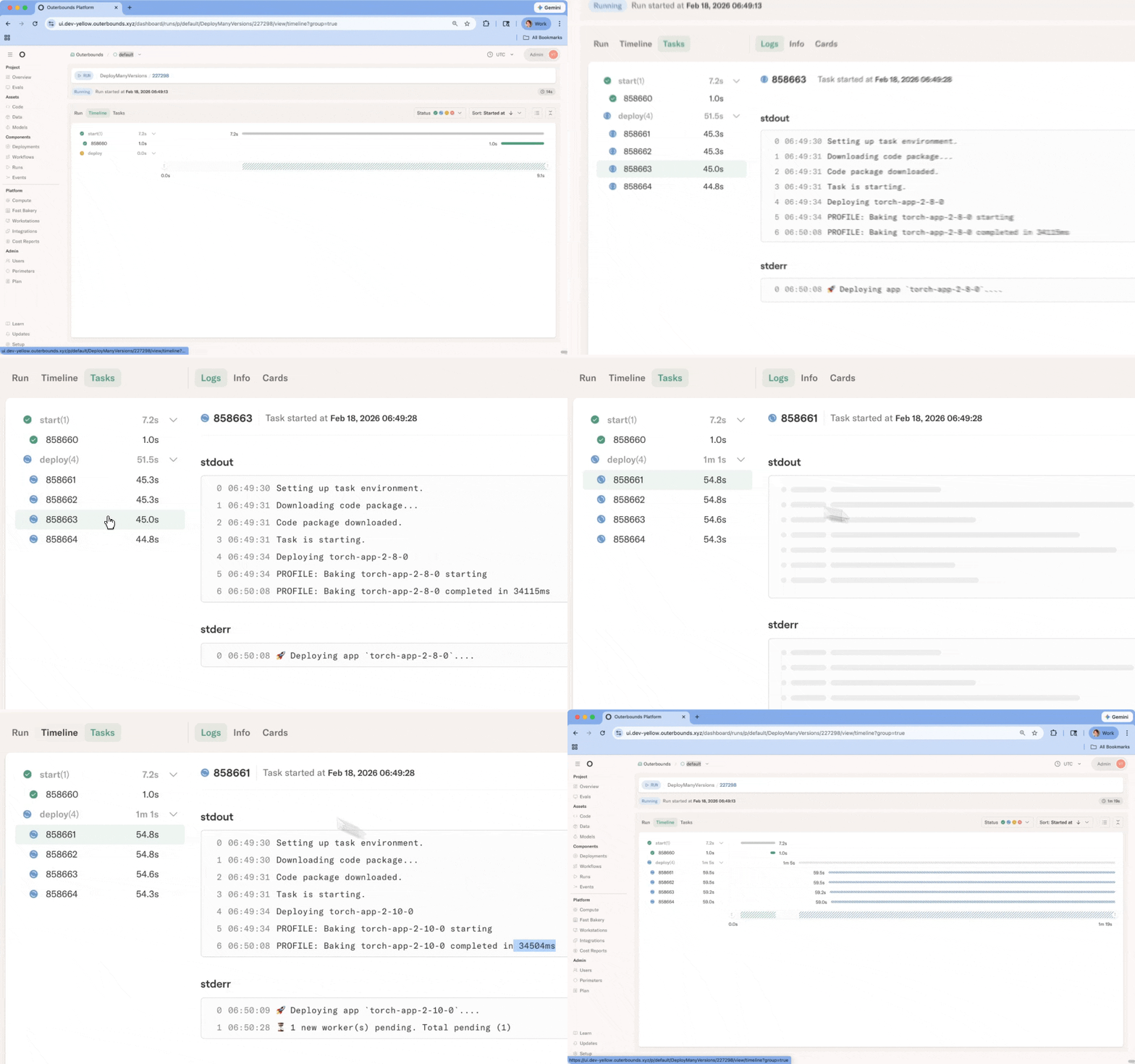
Notice a small but critical detail: lifecycle management. By specifying @app_deploy(cleanup_policy='delete'), we ensure all deployments are automatically torn down once the flow finishes. This allows you to treat services as sidecars whose existence is bound to the parent flow.
Example: Orchestrating offline and online agents
Beyond standard service deployments, agents are a key online use case. We have previously talked about how Metaflow and Outerbounds support offline, deep research or coding agents which take minutes to complete their task without human intervention. With the Deployments API, we can expand the support to cover interactive, online agents as well.
It is extremely powerful to be able to couple and coordinate online and offline agents jointly. In the example below, a sandboxed Claude Code agent handles the heavy lifting of data preprocessing, feeding the results to an online agent that brings a human in the loop.
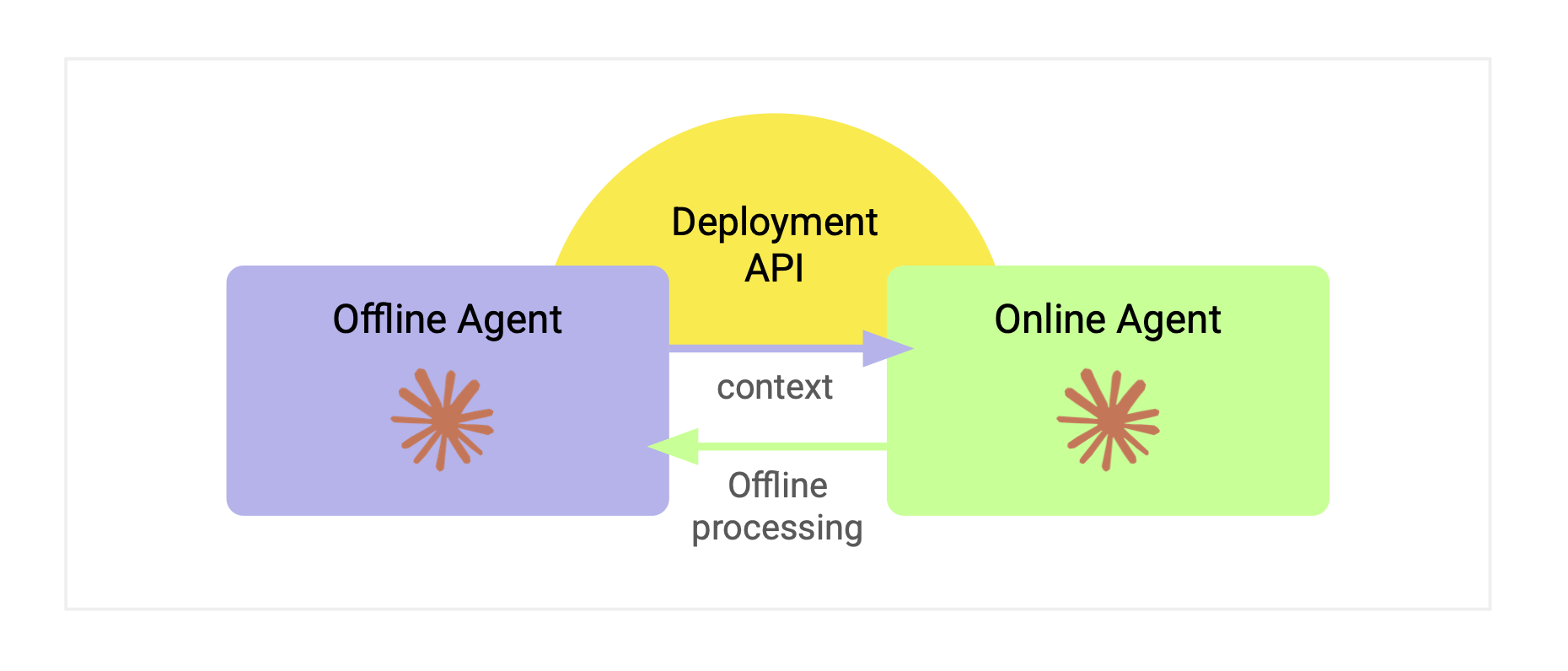
It is remarkably straightforward to embed and use Claude Code in a step - including all software dependencies and API secrets:
async def query_claude(self):
    from claude_agent_sdk import query, ClaudeAgentOptions
    options = ClaudeAgentOptions(
        allowed_tools=["Read", "Write", "Bash"],
        permission_mode='acceptEdits'
    )
    return [msg async for msg in query(prompt=self.prompt)]

@pypi(packages={'claude-agent-sdk': '0.1.37', 'anyio': '4.12.1'})
@secrets(sources=["outerbounds.claude"])
@step
def agent_step(self):
    import anyio
    self.prompt = 'analyze data'
    self.results = anyio.run(self.query_claude)
    self.next(self.end)
The results preprocessed by an offline agent are then passed to an online agent, which is launched on the fly using the Deployment API, as in the first example above. In this example, we asked Claude to create a simple web UI that allows us to explore the preprocessed artifacts interactively, as shown in this short clip:
As shown in the clip, Outerbounds provides a robust and versatile base player for enterprise agentic applications:
- You can run any number of offline and online agents in parallel within secure, isolated sandboxes, delineated by perimeters — all inside your own cloud environment.
- If your agents need to process large volumes of data or leverage private LLMs, you can access top-tier GPUs through Outerbounds’ unified compute layer, which spans all hyperscalers and leading AI clouds.
- All assets — code, data, and models — are packaged and managed automatically (including container images!), allowing you to focus on context engineering, evaluations, and business logic.
- Develop agents rapidly with software engineering best practices, thanks to Outerbounds Projects, branches, and built-in CI/CD support.
- Observe and evaluate agents with domain-specific UIs and a full audit trail.
Remarkably, the entire agent integration takes only about 10 lines of code embedding Claude Code.
Start deploying your full AI stack
Whether you're deploying traditional ML models, state-of-the-art agents, or supporting microservices, the Deployments API provides a unified, programmatic path from offline development to fully operational online services. Build images automatically, deploy endpoints in seconds, orchestrate agents, and maintain complete consistency, lineage, and control across your entire system.
Outerbounds can be deployed in your own AWS, GCP, or Azure account in as little as 15 minutes, so you can start deploying immediately.

Start building today
Join our office hours for a live demo! Whether you're curious about Outerbounds or have specific questions - nothing is off limits.
We can't wait to meet you soon! Keep an eye out for a confirmation email with the deets.


